 Frequently Asked Questions
- Create a security group on the Active Directory Server and add some users to the group.
- On the Directory information tree structure, create ldapServers, ldapMappings and ldapSources using the Meeting Server API. (See the API Reference guide for details.)
When posting ldapSources, a POST URL format has to be used: see the following example.
In this example, Active Directory in Windows Server 2008 R2 64bit and Postman are used.


- To import users from a security group called “demouser” with baseDn (cn=Users, dc=acanodemo, dc=com), we suggest the filter (see over page):
(filter=%28%26%28memberOf%3A1.2.840.113556.1.4.1941%3A%3Dcn%3Ddemouser%2Ccn
%3DUsers%2Cdc%3Dacanodemo%2Cdc%3Dcom%29%28objectClass%3Dperson%29%29)
 Filter through API:
Note: Entering the same filter through a user interface and by using the API requires slightly different strings. Using the example above:
Filter on web page:
 (&(memberOf:1.2.840.113556.1.4.1941:=cn=demouser,cn=Users,dc=acanodemo,
dc=com)(objectClass=person))%28%26%28memberOf%3A1.2.840.113556.1.4.1941%3A%3Dcn%3Ddemouser%2Ccn
%3DUsers%2Cdc%3Dacanodemo%2Cdc%3Dcom%29%28objectClass%3Dperson%29%29The following output of GET should be seen.
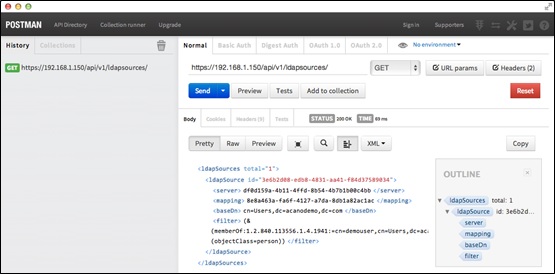
-
<filter>(&(memberOf:1.2.840.113556.1.4.1941:=cn=demouser,cn=Users,dc=acanodemo,
dc=com)(objectClass=person))</filter>
- Start a Sync either using the API or the Web Admin Interface.
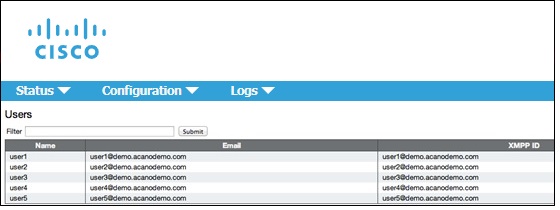
If users are not imported, try the following:
- If possible, delete all LdapSources through the API, configure these sources using the Active Directory Web interface, and then check if users are imported when synchronizing.
- If the first method is not possible, modify the filter to be a simple one; for example, “objectClass=person” and try to import users from an OU. This will confirm that the issue is with the filter.
- Last update:
- 25-Oct-2019
- FAQ ID:
- 1052